
If you don't find your antenna in proposed default antennas, you can ask Siradel to load it to your environement.
You can prepare antenna pattern in format .msi or .xml, and send the request to software-support@siradel.com
Add Antenna pattern through API
If you can't add your antenna patterns to the web client directly through the interface, you can do it through API.
Reach Postman documentation in antenna section to see how to do it.
You can find antenna file samples in Resources
Example using Postman
If you are using Postman to updload an antenna, you must follow the steps below.
Set up your environment and credentials
Use Access Token URL : https://keycloak.bloonetws.siradel.com/realms/volcanoweb/protocol/openid-connect/token
Set up your username and password.
Log in
In authorization tab, Click on get new access token, and use your token.
Create antenna
Reach Antennas\create section.
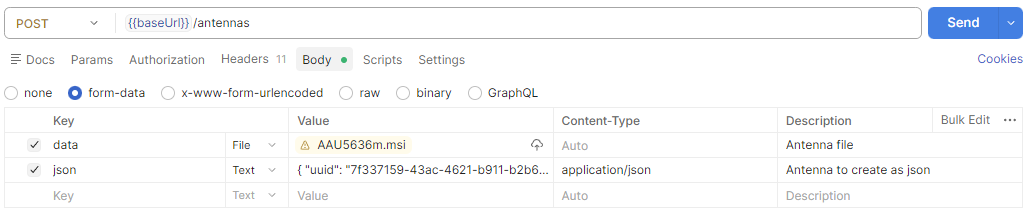
Once created, it must send back a 201 validation.
