
Running radio simulations in a SaaS environment requires awareness of session limits and inactivity timeouts. In Amazon WorkSpaces, session management policies are designed to ensure security, performance stability, and optimal resource allocation.
This guide outlines best practices to help you avoid unexpected disconnections, optimize simulation runtime, and maintain workflow continuity when using Siradel Planner on the SaaS platform.
1. Understand the 16-Hour Maximum SaaS Session Duration
Session Duration Limit
After login, a Siradel Planner SaaS session has a maximum duration of 16 hours.
-
The 16-hour counter starts immediately after the first authentication.
-
Once 16 hours are reached, the session will end automatically.
-
Consequently, a single simulation run in SaaS mode cannot exceed the 16 hours defined for the maximum session duration of Amazon WorkSpaces.
Best Practice for Long Simulations
If you plan to launch a long-duration simulation:
-
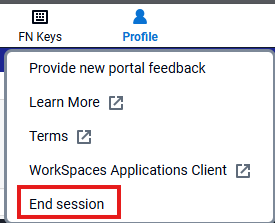
End the session before starting the simulation
-
Reconnect and start a new Amazon WorkSpaces session.
-
Open your project and launch the simulation immediately after reconnecting
This ensures the full 16-hour session window is available for your simulation.
2. Optimize Simulation Time to Stay Within Limits
If the computation time of a single simulation approaches the 16-hour limit, consider reducing computational load using the following strategies:
Modify Simulation Resolution
Reducing resolution significantly lowers computation time.
-
Example: Change the simulation resolution from 10m to 20m
-
Impact: Fewer calculation points → Faster execution
This is often the most effective optimization lever.
Reduce the Study Zone
Limit the study area to what is strictly necessary:
-
Remove non-essential regions
-
Focus only on priority coverage zones
Smaller study areas reduce processing time.
Use Boost Simulation Mode
Siradel Planner provides a Boost Simulation Mode, which is enabled by default and configurable in the Propagation Model GUI.
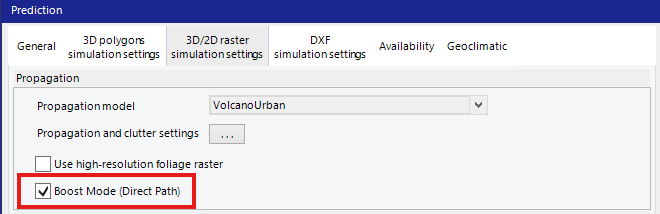
The Boost mode can significantly reduce computation time while maintaining a high level of simulation accuracy suitable for engineering and planning purposes.
3. Manage Inactivity
The following inactivity rules apply depending on whether Siradel Planner is running or closed, and determine when a SaaS session will be automatically terminated.
If:
-
Siradel Planner is running,
-
No simulation is in progress,
-
No mouse or keyboard interaction occurs,
Then:
-
After 1 hour of inactivity, the session is automatically terminated.
-
A recovery project is saved before termination.
This mechanism is part of Siradel Planner’s internal timeout management.
If Siradel Planner is closed:
-
The Amazon WorkSpaces session is automatically terminated after 15 minutes.
Best Practice
-
Avoid leaving the application idle for extended periods.
-
Save your work regularly.