
This article lists common error messages that may appear when running simulations in Siradel Planner (Cell Prediction, Automatic Cell Selection, Automatic Cell Planning, Access Auto Assignment, etc.).
Each section describes the meaning of the message, why it occurs, and how to resolve it.
“The transmitter is outside the vector layer” ou "Map data is missing at transmitter position"
Message:
An error occurred during computation: The transmitter is outside the vector layer, or
An error occured during computation: Map data is missing at transmitter position
Meaning
The transmitter’s coordinates fall outside the map data zone.
How to resolve
-
Move the transmitter inside the map coverage area.
-
Import additional tiles covering the required area.
-
Verify that the coordinates and projection are correct.
“Error when prediction radius/resolution ratio is greater than minimum allowed”
Message:
An error occured during computation: Error when prediction radius/resolution ratio is greater than minimum allowed (XXXX > 3000)
Meaning
Planner enforces a limit on the ratio between the prediction radius and the simulation resolution.
By default, this ratio must not exceed 3000.
When the value shown in the message (XXXX) is higher than 3000, the simulation cannot proceed.
How to resolve
-
Increase the simulation Resolution value.
-
Reduce the prediction radius:
-
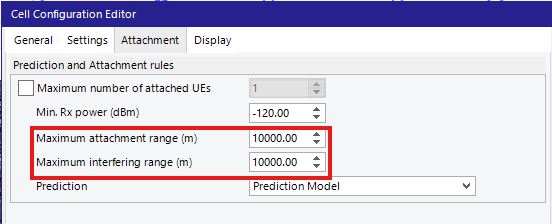
Reduce Maximum attachement range and Maximum interfering range values on Cell configuration Editor GUI
-
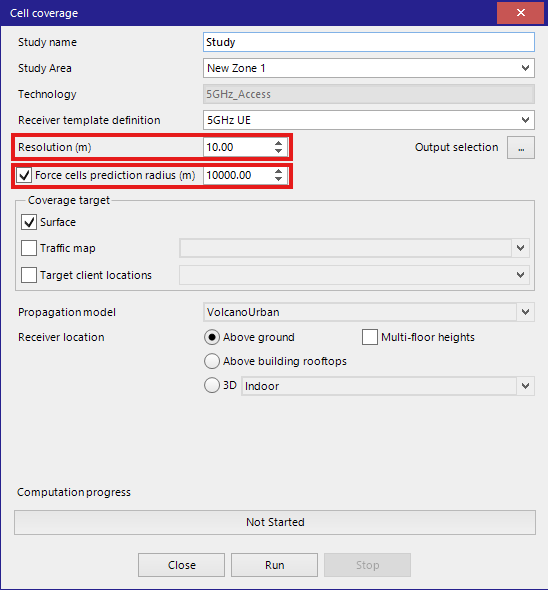
Reduce Force cells prediction radius value on Cell coverage GUI (if this option is activated)
“Internal error”
Message:
An error occurred during computation: Internal error
Meaning
A generic computation failure occurred during simulation.
Possible causes
-
A transmitter is located outside the DLU layer.
-
The mapdata index or menu files are inconsistent or corrupted. (for Desktop users)
-
Out of memory.
How to resolve
-
Verify that all transmitters lie within the covered map area, as explained in the section of error message “The transmitter is outside the vector layer”.
-
Ensure the mapdata folder structure follows the Volcano MapData Requirements. (for Desktop users)
-
Try running the simulation on a smaller zone to check whether the error persists.