
The active UE template defines the characteristics of the receiver that will be considered for the coverage simulation.
-
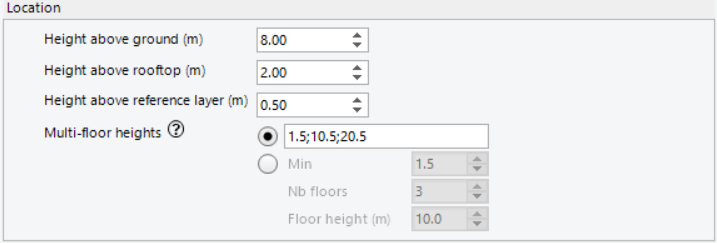
Height above ground (m): Defines the simulation height above ground
-
Height above rooftop (m): Defines the simulation height above the building height
-
Height above reference layer (m): Defines the simulation height above the reference layer(s) selected from the 3D model (relevant for Volcano Flex)
-
Multi-floor heights (m): Defines the different height values and the number of heights to be considered when running a coverage simulation
When running the Coverage simulations, the user can select various options to set the receiver location in the Cell coverage settings from the 'Receiver location' tab.
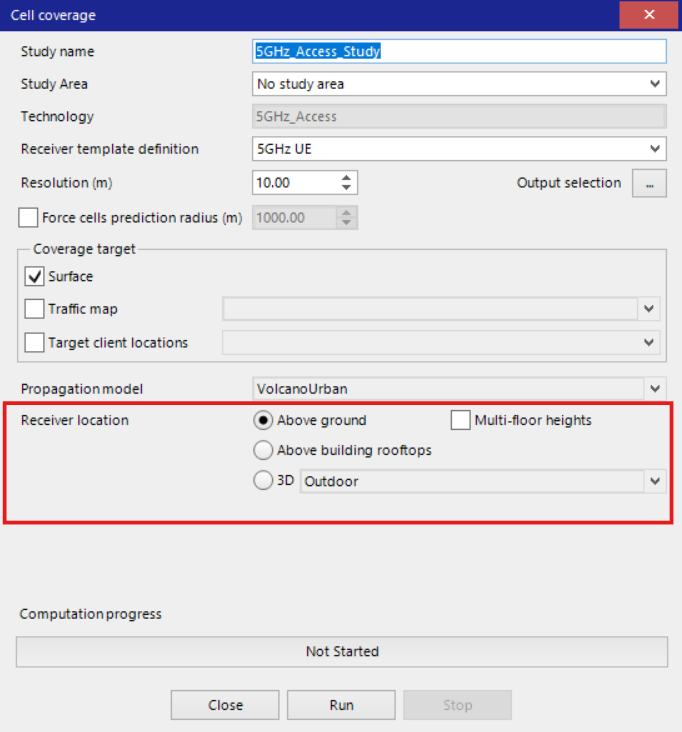
Receiver location options:
-
Above ground
Simulates receivers at a fixed height above the terrain surface.
Use this setting when you want to predict coverage for UEs located outdoors at a specific height (e.g., human level, vehicles, or general street-level receivers). The height set in the Height above ground (m) specified in the UE template is considered for this option. -
Multi-floor heights
Simulates receivers at several fixed heights corresponding to different floors within buildings.
Enables coverage prediction at multiple heights to analyze the vertical distribution within multi-story structures. The heights (e.g., 1.5 m, 10.5 m, 20.5 m) set in the Multi-floor heights (m) specified in the UE template are used to analyze coverage on different floors or levels. -
Above building rooftops
Simulates receivers placed above the rooftops of buildings.
Choose this if you are interested in coverage for rooftop UE installations. It is often useful for urban scenarios with variable building heights. The height set in the Height above rooftop (m) specified in the UE template is considered for this option. When using this option, all the pixels or UEs that are not on the building rooftops are excluded from calculations. -
3D - Outdoor or Indoor
Simulates coverage in a fully three-dimensional outdoor or indoor context.
This proves valuable for detailed 3D coverage analysis applicable to scenarios requiring both vertical and horizontal building facade coverage. The 'Outdoor' option provides the coverage on the external walls of the building while the 'Indoor' option povides the coverage on internal walls of the building by taking into acccount the penetration loss.
These settings enable precise control over the location and height of simulated receivers, ensuring your coverage predictions are tailored to the specific deployment scenario and user environments you are modeling. Each option is chosen based on whether your focus is street level, rooftop, or true 3D spaces like external or internal building facades.